Outlook

Integrating District360 with Existing Tools: Seamless Technology Solutions for Enhanced Efficiency.

Most downtown teams already have something for email, something for events, something for payments. What they rarely have is a way to make those tools talk to each other, and that silence is where hours go: re-entering data, chasing contacts, and following up on things that should have been automatic. An integrated platform is how you close that gap.

Why this matters
Disconnected tools cost more than your subscription fees
Every time a team member copies a spreadsheet, chases down a contact, or manually reconciles a list, that is time that could have gone toward the work that actually moves the district forward. An integrated platform does not add more technology. It makes the technology you already have finally work together.
Overview Integrations In practice Why it matters FAQ Contact

Your tools are not the problem. The gaps between them are.

When you are busy organizing events, supporting local businesses, and responding to what your community needs, the last thing you have time for is figuring out how your different tools fit together just to get a single task done. Yet that is exactly what most district teams are managing: platforms that each do their job well in isolation, but that leave people copying data, switching tabs, and second-guessing whether the information they have is current.

District360 was built to bridge those gaps, not by replacing the tools your team already knows, but by connecting them into a single picture you can act on. When a contact fills out a form, updates flow to your email lists. When an event registration comes in, it becomes part of that attendee’s full record. When a payment is processed, billing closes automatically. Each step triggers the next, behind the scenes, without anyone having to move the pieces manually.

Five categories where connected tools make the biggest difference.

No two districts integrate in the same sequence, and the right starting point depends on where time is lost the most. These five categories cover the integrations that district teams find most valuable once they are running.

Category 01
Mailchimp Constant Contact Pardot

Email and marketing tools

Engaging with your community is a large part of the work, whether that means sharing updates, promoting events, or sending newsletters. When your email platform is connected to your central system, every message, click, and follow-up is stored on individual contact records, so any team member can see what has been shared, when, and how people responded.

  • Contact sign-ups from forms automatically populate the correct email lists, with tags based on what they signed up for, so future emails feel relevant without manual sorting.
  • Email performance, including opens and click rates, is visible directly within District360, giving your team a clear picture of which messages are working.
  • For more complex campaigns involving local partners or property owners, Pardot enables automated follow-up journeys that adjust based on how someone interacts with your content.
Category 02
Eventbrite

Event management

When Eventbrite is connected to your platform, registration information flows in automatically: attendee names, ticket types, and answers to event questions all land as structured records rather than as a spreadsheet you have to import later. The result is a cleaner picture of who attended, and a foundation for meaningful follow-up.

  • Attendee history becomes part of each contact’s full record, so your team can see who has come to multiple events without digging through separate exports.
  • Segmenting attendees for post-event outreach or future invitations takes a few clicks rather than a manual list-building exercise.
  • Tracking trends across events, such as repeat visitors or sessions with the highest turnout, becomes straightforward when all the data is in one place.
Category 03
Onsolve ELERTS

Alerts and communications

Public alerting tools like Onsolve and ELERTS handle weather updates, emergency notifications, traffic incidents, and security notices. When they are connected to your central platform, each alert you send becomes part of the district record, not a one-off broadcast that disappears after delivery.

  • Engagement data from each alert, including who received it and how they responded, is logged and visible in one place.
  • Follow-up is manageable without switching platforms, because the alert history sits alongside the rest of the contact’s record.
  • Over time, this visibility helps planners understand which communication types resonate and where gaps in reach may exist.
Category 04
Stripe Give Lively

Payments and donations

Stripe handles online payments and subscriptions, and once it is connected, payment records, statuses, and receipts appear in your platform as soon as they are processed. That eliminates manual entry, reduces billing errors, and ensures everyone on the team sees the same financial picture. For districts with a fundraising component, Give Lively keeps donor profiles current and captures giving history automatically, so thank-you notes and renewal outreach happen at the right moment, not after a data cleanup.

  • Invoices, overdue notices, and receipts are managed automatically for permits, memberships, and subscriptions.
  • Donation history surfaces within each donor’s contact record, making relationship-building feel more considered and less reactive.
Category 05
FormAssembly Fleet.io City 311

Forms, fleet, and service requests

This category covers the operational fabric of a district: permit applications, vehicle tracking, and community submissions. FormAssembly turns online forms into structured records in your platform, so vendor applications and surveys land where they need to be without anyone importing a spreadsheet. Fleet.io tracks vehicle usage, maintenance, and schedules, giving field and operations teams a shared log. City 311 submissions come in as tagged, trackable cases, organized by type, location, and urgency, so nothing that residents report gets lost.

  • Cases from 311 are logged, tracked, and followed up on from one place, with a full record of each issue from submission to resolution.
  • Permit applications from FormAssembly trigger follow-up steps automatically, including invoicing and confirmation emails, without requiring anyone to move data manually.
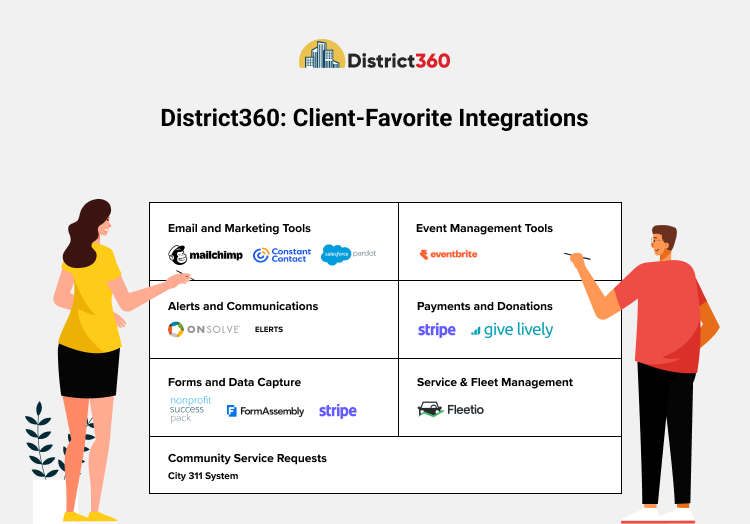
Email and marketing integrations connected through a downtown district platform
In practice

What a connected day looks like for a downtown team.

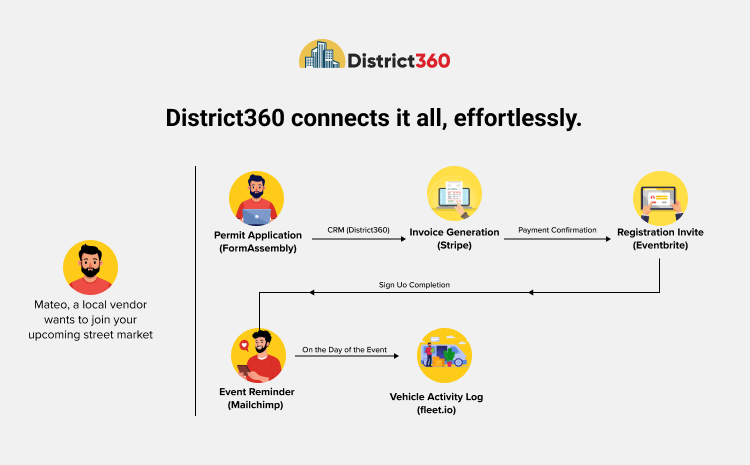
To make this concrete, consider Mateo, a local vendor who wants to join an upcoming street market. He fills out a permit application form online. His details flow automatically into District360, which generates an invoice through Stripe. Once his payment is confirmed, he receives a confirmation email and an Eventbrite invitation to register for the market. He signs up, picks his booth spot, and gets a reminder the day before. On market day, your team’s shared equipment is tracked through Fleet.io, and all vehicle activity is logged for future planning.

No one on your team moved those pieces manually. Each step was triggered by the one before it, because the tools were connected. That is what integration actually looks like from the inside.

1
FormAssembly
Vendor fills out permit application online
2
Stripe
Invoice generated and payment collected automatically
3
Eventbrite
Confirmation sent with market registration link
4
Mailchimp
Day-before reminder delivered automatically
5
Fleet.io
Setup vehicles and equipment logged for planning
Ready to see this running in your own district?

We set up District360 around the tools your team already uses. Whether you are starting with one integration or building out a full connected workflow, we will walk you through it and make sure things are working the right way before you go live.

Walk through your setup
District360: simplifying your workday through connected tools

Four things that change when your tools are connected.

The benefits of integration are not primarily about saving clicks. They show up in the quality of communication, the reliability of your records, and the trust that your district builds with the people it serves.

You save time and avoid mix-ups.

Data that syncs automatically does not need to be retyped or copied over, which cuts down on mistakes and gives your team back the time that used to go toward reconciling lists, chasing down records, or double-checking whether a payment came through. The hours add up faster than most teams expect once they start tracking them.

You get a clearer picture of what is happening.

From emails and event sign-ups to donations, permits, and vehicle logs, everything surfaces in one place. That makes it easier to spot what is going well and where a little extra attention might be needed. Decisions that used to require a report request now happen in the course of a regular check-in.

Your outreach feels more considered.

When you can see who attended an event, who donated to a project, or who submitted a 311 request, your follow-ups can reflect that history. People notice when messages feel relevant to what they actually did, and that kind of continuity is what turns a one-time interaction into a longer-term relationship with your district.

It builds trust in how your district runs.

When alerts go out on time, when vendors hear back quickly, when residents see that issues they reported were actually addressed, the reliability is visible. Residents, visitors, and businesses start to feel that the district is on top of things. That sense of dependability is something integration quietly supports, every day, without anyone making a point of it.

A day in the life with District360: how integrated tools support downtown district work

Integration is not a technology project. It is an operational decision.

The tools exist. The question is whether your team is getting full value from them, or whether the gaps between them are quietly costing you time, accuracy, and follow-through every week.

  • Where does data currently get moved manually in your district, and how often does something slip in that transfer?
  • Which of your existing tools is generating information that no one is fully using because it lives in isolation?
  • If your team could see every contact, event, payment, and service request in one place, what would change about how you make decisions?
District360: a flexible platform built to connect and support downtown district teams

Thinking about where to start with integrations?

We have helped downtown districts of all sizes set up their first integrations and build from there. If you want to talk through which connections would make the biggest difference for your team, we are happy to share what has worked for others.

Questions about integrating tools in a downtown district.

Where should we start if we have never integrated our tools before?+
Start by identifying the one or two places where your team spends the most time moving data manually, whether that is keeping email lists current, importing event registrations, or reconciling payment records. Solving the biggest friction point first tends to build confidence and momentum for the rest. We typically recommend beginning with email or event management because the impact is visible quickly and the workflows are familiar.
Do we have to replace the tools we are already using?+
No. The integrations are designed to work with the tools your team already knows: Mailchimp, Eventbrite, Stripe, and others. The goal is to connect those tools so that data flows between them automatically, not to ask your team to learn an entirely new way of working. You keep what works. You close the gaps that have been costing you time.
How long does it typically take to set up an integration?+
It depends on the complexity of the tool and how your existing data is structured, but most individual integrations are up and running within a few days. The more important factor is giving your team time to get comfortable with the new workflow before adding the next connection. A phased approach, one integration at a time, tends to stick better than trying to connect everything at once.
What happens to the data we already have in our existing tools?+
Existing data can be migrated into District360 during the setup process, so your history does not disappear. We work through that process with you to make sure records are clean and structured correctly before anything goes live. The goal is continuity, not a fresh start, because the history of your contacts and your district’s work has real value and should not be abandoned just because the platform changes.
Can a smaller district use these integrations, or are they designed for larger teams?+
The integrations scale to the size of your district and the tools you actually use. Smaller teams often find that even one or two well-chosen integrations, like connecting their email list to their event registrations, save several hours a week. You do not need a large team or a dedicated data person to get meaningful value from a connected setup. The benefit scales with the volume of work, not the size of the organization.

Continue reading.

Working through this in your own district?

We are happy to share what is working for others.

Talk To An Expert