Outlook

Google Business Insights Has Arrived in District360.

Staying on top of business openings, closings, ownership changes, and updated contact details is one of the most time-consuming parts of running a downtown district. For most teams, staying current has meant walking streets, searching Google, and calling around — effort that belongs elsewhere. With Google Business Insights built directly into District360, that effort is no longer necessary.

Why this matters
Your CRM should know when a business closes. It can, now.
When your business data is stale, the downstream costs are real: ambassadors dispatched to empty storefronts, directories that mislead visitors, outreach sent to disconnected numbers. Google Business Insights pulls live data directly from Google Business Profiles and keeps your records current without anyone having to chase it down.
The manual problem What the feature does Real-world impact Getting started FAQ

Keeping business records current has always been a team sport with no clear winner.

In most downtown organizations, business data degrades faster than anyone has time to fix it. A café closes quietly on a Tuesday. A boutique changes ownership and never updates its phone number. A restaurant relocates two blocks away and keeps its old Google listing live for months. Your records reflect none of this until someone notices the hard way.

The current approach looks familiar across most districts. Someone walks the streets to do a visual check. A staff member searches Google to verify a listing before an outreach call. An ambassador shows up at an address that is now a vacant unit. These are not failures of effort; the team is doing everything it can with the tools available. The problem is that manual verification does not scale, and the pace at which business information changes will always outrun the pace at which a team can check it.

The cost of stale data is rarely dramatic. It tends to accumulate quietly: time spent on calls that go nowhere, field visits that turn up nothing, directories that point visitors to businesses that no longer exist. Individually, each one is a small friction. Collectively, they add up to a significant drain on the team’s capacity for work that actually moves the district forward.

Downtown district team navigating the challenge of keeping business information accurate and current

Three things Google Business Insights keeps current, automatically.

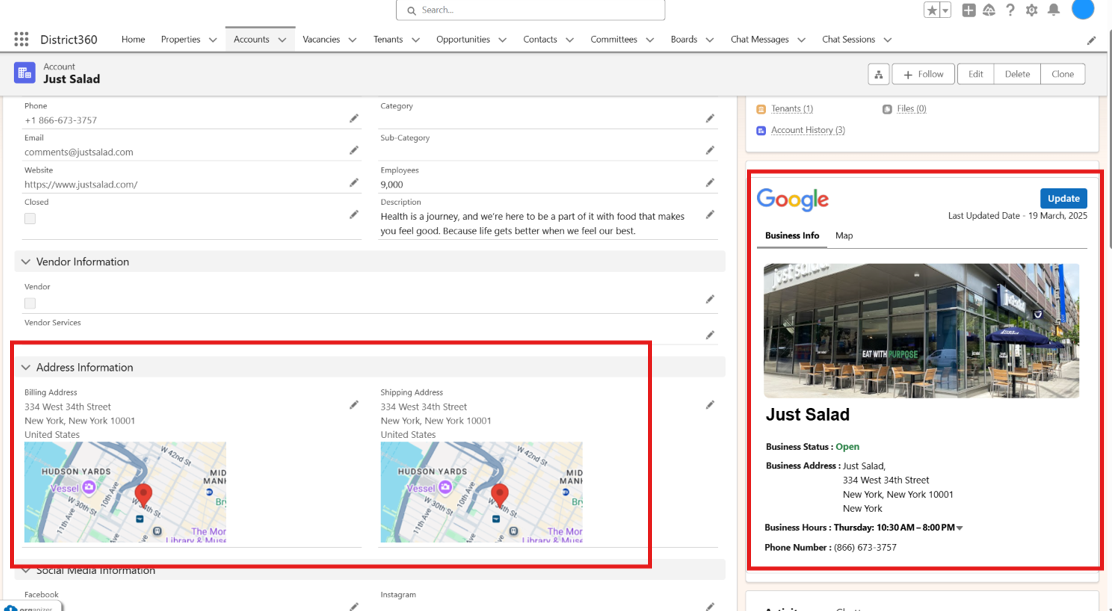
The feature works by connecting District360 to Google Business Profiles and syncing the most up-to-date public business information directly into your CRM records. No manual entry, no periodic import, no checking Google separately and then updating a field by hand. When a business’s Google profile changes, your District360 record reflects it.

Signal 01

Business status

Whether a business is open, temporarily closed, or permanently closed is now visible directly in District360, pulled from the business’s Google profile in real time. Your team stops finding out a business has closed when an ambassador arrives at an empty storefront.

  • Open, temporarily closed, and permanently closed statuses synced automatically
  • Status changes visible immediately in the business record
  • No more relying on a manual walkthrough to discover closures
Signal 02

Contact details

Phone numbers and websites flow into your CRM as businesses update their Google profiles. Outreach coordinators always have a working number to call, and your public-facing directories stay accurate without anyone having to play phone tag to verify what changed.

  • Updated phone numbers synced when a business changes them on Google
  • Website URLs kept current without manual re-entry
  • Fewer disconnected calls and failed outreach attempts
Signal 03

Physical location

When a business relocates, your system moves with them. Address updates flow through automatically so that field teams are dispatched to the right place, and your district map reflects where businesses actually are, not where they used to be.

  • Address changes captured when businesses update their Google listing
  • Field dispatch based on current location, not historical records
  • District maps and directories reflect real-world relocations
Google Business Insights syncing live business profile data into District360 records

What changes when your business data keeps itself current.

The shift from manual verification to automatic sync is not just a workflow improvement. It changes what the team is able to focus on, because the hours that used to go toward chasing updates can go toward the work that actually requires human judgment and presence.

For field teams, the most immediate change is confidence. Ambassadors are dispatched knowing the address is current and the business is open. Graffiti reports and maintenance requests can be routed to active businesses rather than vacant units. The team stops operating on assumptions and starts operating on verified information.

For outreach coordinators, it means every call starts with a working number, every email goes to a current contact, and every engagement is built on a record that reflects what is actually true on the ground. The conversations that would have started with “I’m sorry, I had an old number for you” simply don’t happen.

For the district as a whole, accurate business data is a service to the community. Visitors who check your directory and find it reflects reality will trust it the next time they look. Stakeholders who see your district map keeping pace with what is actually open will trust the reports you share with them. Data quality compounds over time, in both directions.

Stop sending your team out with yesterday’s information.

We can walk you through how Google Business Insights connects to your existing District360 records and show you what your business data looks like once it is live.

See it in your district
If you are already on District360, it is already working.

Google Business Insights is available to District360 users with no setup required, no additional training, and no extra tools to configure. The sync runs in the background, keeping your business records current as Google profile information changes. The feature does not require anyone on your team to do anything differently, though there is genuine value in knowing how to read and act on what it surfaces.

For teams that want to get more deliberate about using the data, a short walkthrough with our team can help you understand which records are being synced, how to identify businesses whose Google profiles may need attention, and how to connect the insights to your existing outreach and field workflows.

When the system handles the chase, your team handles the district.

The districts that benefit most from Google Business Insights are not necessarily the ones with the most businesses or the biggest teams. They are the ones that recognize how much capacity gets quietly consumed by manual verification, and choose to redirect it toward work that requires human judgment.

  • How much time does your team currently spend verifying business information that should already be in your system?
  • Which workflows — field dispatch, outreach, directory publishing — would change first if your business records were always current?
  • What would your team be able to do with the hours that manual verification currently takes?

Questions that come up when teams start using Google Business Insights.

How does District360 get access to Google Business Profile data?+
Google Business Insights pulls from publicly available Google Business Profile information, the same data anyone can see when they search for a business on Google. No special access to a business’s private account is required, and businesses do not need to do anything to make their information available. The feature reads the public profile and syncs what it finds into your District360 record for that business.
What happens if a business’s Google profile has incorrect information?+
The feature syncs what Google shows, so if a business’s Google profile is outdated or inaccurate, that will be reflected in the sync. In practice, this is a useful signal: a business with a stale or inaccurate Google profile is often one that would benefit from outreach from your team, either to encourage them to update their listing or to verify their current status directly. The sync surfaces discrepancies rather than hiding them.
How often does the sync run?+
The sync runs regularly in the background, keeping records updated as Google profile information changes. The exact cadence is designed to balance data freshness with system performance. For most operational purposes, your team can treat the business status, contact, and location fields as current without needing to verify them manually before acting on them.
Does this replace the need to do any manual business outreach or verification?+
It reduces the need for verification-driven outreach considerably, but it does not replace relationship-driven engagement. Your team will still want to connect with businesses directly for qualitative conversations, event coordination, and district programming. What changes is that those conversations no longer have to start with confirming whether a phone number still works or whether an address is still current. The relationship work becomes the focus rather than a task that has to wait until the basics are confirmed.

Continue reading.

Want to see what your district’s business data looks like when it keeps itself current?

We are happy to walk you through it in just a few minutes.

Talk To An Expert